For Mac · PDF preparation and editing
PDF-Paddock: the essential companion for working with PDFs.
PDF-Paddock fixes, resizes, edits and checks your files: bleed, crop marks, CMYK, PDF/X, text, fonts. Your PDFs stay on your Mac; your originals are never overwritten.
For Mac, macOS 14 (Sonoma) or later, Apple Silicon. Interface in French and English.
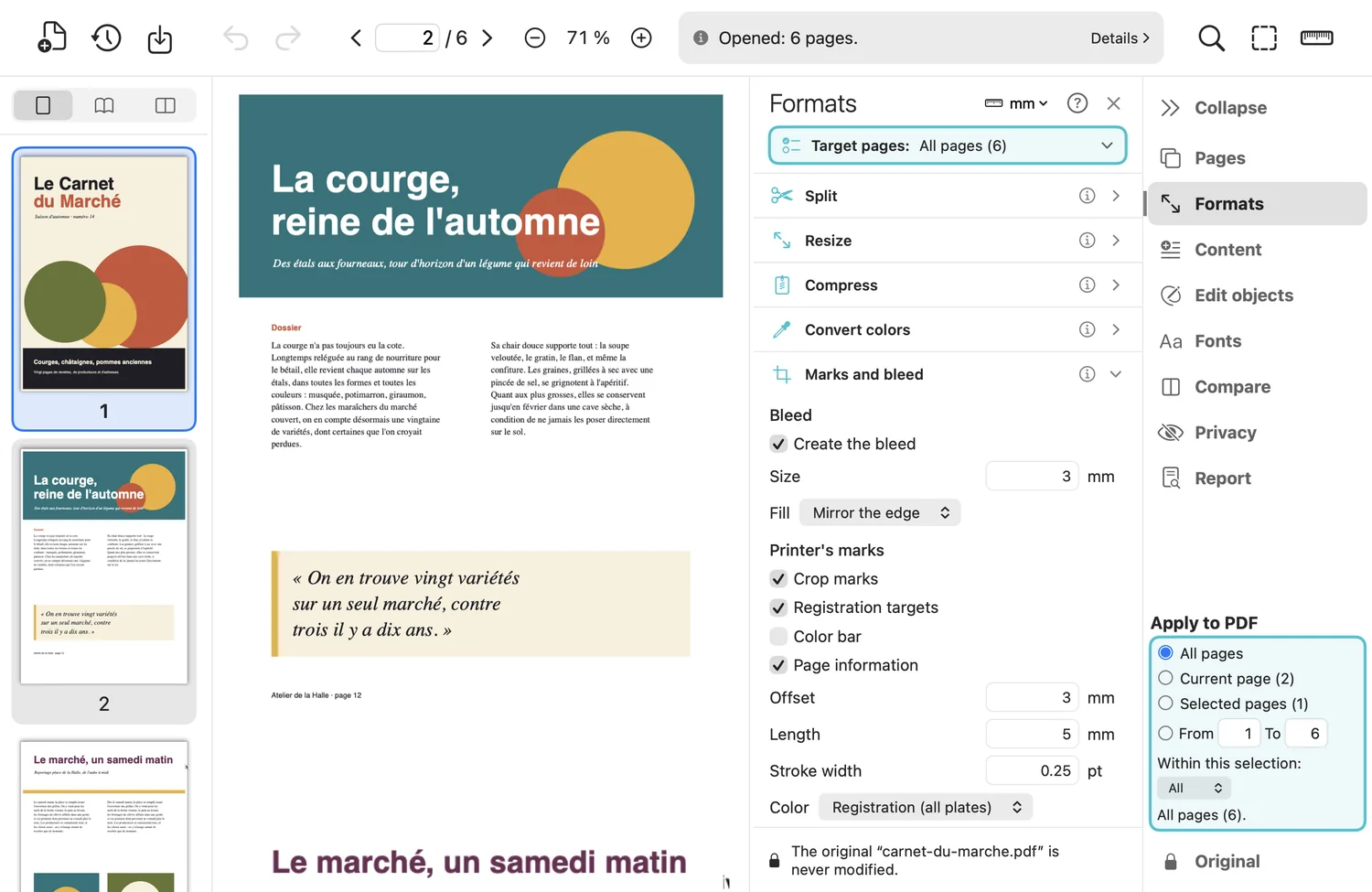
The PDF-Paddock window: thumbnails on the left, page in the center, tools on the right.
Your PDFs stay with you
Everything happens on your Mac. The app only goes online for the free font catalog, if you ask for it, and to check your license.
Original intact, undo
Each action creates a version. “Undo” removes it; “Save As” writes a new file.
Stay in control of your work
You only change the pages you have picked; the action button reminds you what it will touch.
A precise report of everything you do
“Prepared for PDF/X”, never “certified”; anything a tool cannot process is named in it.
Everything between the file you receive and the file you send
Eight tool families, grouped as in the app. Each page says what the tool does, and what it does not.
Organize pages
Rotate, delete, reorder, duplicate, extract, insert.
Learn more →Resize
A chain of adjustable steps: bleed, stretch, offset, resampling.
Learn more →Marks and bleed
Create the bleed, add crop marks, registration marks, a control strip.
Learn more →Convert to CMYK
From RGB to CMYK with an ICC profile, neutral black and grays as black only.
Learn more →Prepare for PDF/X
PDF/X-4, X-1a and X-3: output intent, trim box, identification, header.
Learn more →Edit objects
Select, move, edit text, transform, reorder.
Learn more →Clean up hidden text
Remove what cannot be seen: text off the page, under an opaque fill, hidden paths.
Learn more →Report and checks
Findings from most to least serious, corrections on a copy.
Learn more →What changes in your file
The most common cases, as the tool handles them. Each row links to the tool's page, which also says what it does not do.
| Topic | In the file you receive | With PDF-Paddock |
|---|---|---|
| Bleed | No bleed: a slightly misaligned cut leaves a white edge. | Bleed created by mirroring the page edge or in a solid color, with crop marks, registration targets and a control strip. |
| Colors | Paths, text and images in RGB. | Converted to CMYK with an ICC profile (yours or your printer's); black stays pure black; whatever is left as is gets named. |
| Size | A file that is not the size of the job. | Scaled without distortion, bleed set side by side, steps you can save. |
| PDF/X standard | A PDF that is not ready for your printer's standard. | Prepared for PDF/X-4, X-1a or X-3, with the list of what still sets it apart. “Prepared for”, never “certified”. |
| Hidden text | Text you cannot see: an old issue under a logo, text outside the page. Copy and paste picks it up. | Removed after a preview, without changing how the pages look. |
| Fonts | The file arrives without its font. | A close free font, ranked with a preview; the lines are rewritten with an embedded subset. |
| Redaction | A black rectangle over text: the text stays in the file. | What lies under the area is removed from the file itself, character by character. |
| Check | A file whose flaws you do not know. | A report ranked from most to least serious, with fixes applied to a copy. |
How it works
Open a PDF
Thumbnails, page and tools appear. Page boxes are drawn with one click.
Choose the pages and the tool
Select thumbnails, open a tool's section, adjust it or reuse the client's preset.
Check, then save
Compare with the before, undo if needed, then “Save As”: the original stays intact.
Speaks the language of print
Media, crop, bleed, trim, art: the five page boxes are visible on the page, measurable and adjustable. Lengths are expressed in millimeters, centimeters, inches, points or picas, your choice. A client's settings are saved as a preset and duplicated for the next one.
What PDF-Paddock does not claim to do
- It is not a layout application: it fixes and prepares PDFs, it does not compose them from scratch.
- It prepares for PDF/X but does not certify: no official validator is built in. Your printer has the last word.
- “Compress” does not reduce fonts; “Edit objects” does not edit text whose font has an unknown encoding.
- For Apple Silicon Macs only, for now.
One license, every tool
PDF-Paddock is bought once: $19.90 per seat (1 Mac), updates not included. No feature hidden behind a higher tier.